
How to Set Up Custom Business Rules in Guidewire ClaimCenter?
-
Not every insurance business runs on the same standard platform. Unique insurance businesses require specific custom settings. Guidewire is the best software in helping insurance companies to create customized business systems. In Guidewire there are different modules and one of them is ClaimCenter that is used for particularly setting the claims. Insurance organisations can define custom business rules to automate routine tasks, efficiently and automatically route claims and enforce corporate policies. The increasing use of Guidewire in insurance companies gives a rise in demand for professionals. With the help of Guidewire Training you can become a professional in this and can become a valuable asset for the firm.
What is Guidewire ClaimCenter?
Guidewire ClaimCenter is the global enterprise claims management platform for Property and Casualty (P&C) insurers. It covers the whole lifespan of a claim, from first notice of loss (FNOL) to investigation, reserving, payments and claim closure.
A Guidewire Certification helps you in getting the best job in any insurance business. But to obtain the credential you need to learn about Guidewire.Why Develop Custom Rules in Guidewire ClaimCenter
Each insurance company has its own approach based on line of business, geography and internal risk appetite. It is uncommon to find standard configurations that meet all operational requirements.
Some common reasons for building custom rules:
● Automatically routes claims to adjusters based on geography, severity of loss or adjuster workload.
● Be on the lookout for claims that don’t make sense and refer them to the Special Investigation Units (SIU). It helps in early fraud detection.
● Set an Authorized clearance check system if the amount is more than the standard set. It is approved by the Financial reserve control manager.
● Implement state-specific timelines for claim acknowledgement, status reporting and file closure.Steps to Create Custom Business Rules in Guidewire ClaimCenter
1. Open Guidewire Studio, and find the Rule Set:
Be kind to the environment. Open Guidewire Studio, and look at the structure of the ClaimCenter project. From there find the Rule Sets folder. Choose the appropriate group depending on when you want your program to execute.2. Create a new rule:
Right-click on the rule set and select "Create a New Rule" to make updates to a rule set. It must be simple to comprehend and have an unambiguous name. In the “Description” field of the form, please give the business purpose.3. Write the rule condition:
In the Condition Tab you are able to write Gosu code which returns true or false.4. State what the regulation does (the “THEN” part):
In the Action tab write the Gosu code that is executed when the condition is met. This can be done by issuing a notification, creating a fraud alert flag or providing an action task to an adjuster:5. Validate, test and deploy:
Studio includes a built-in syntax test feature you may use to validate your Gosu code. In a development environment, conduct local unit tests to ensure that the rule works as expected and does not interfere with existing claim processes. Once you’ve checked out the modifications, add them to your version control system.Best Practices in Creating Custom Rules in ClaimCenter
There are six key guidelines for having a well operating, reliable and easy to maintain ClaimCenter setting below:!
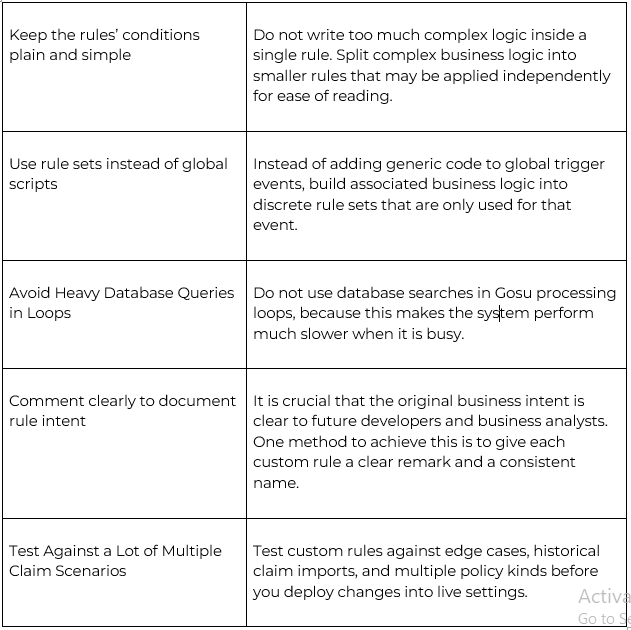
In Guidewire Functional Training you can learn about the tricks, tools and strategies for creating best custom business rules.
Conclusion
Custom business rules are one of the core features in Guidewire ClaimCenter. They ensure that normal claims processing is a fast, automated and error-free process. Gosu rule sets allow insurers to specify specific condition-action combinations for