
Guidewire Rules Engine: How Business Rules Actually Execute at Runtime
-

Insurance systems run many tasks at the same time. Claims get updated. Policies get changed. Payments get checked. Customer details get verified. All these activities depend on rules running inside the backend. In Guidewire, this work is handled by the Rules Engine. It controls how the system reacts during runtime. It checks conditions, validates data, creates activities, and controls transaction flow. This is why many people joining Guidewire Training now focus more on runtime behavior instead of only learning screens and navigation.
Most people think rules run one after another in a simple flow. But that is not how Guidewire actually works. The runtime engine checks entity changes, transaction states, and rule categories before starting execution. Every rule runs based on a trigger inside the application.How Rules Start Inside the System?
Whenever a user updates a claim or changes policy data, the system sends an event to the runtime engine. The engine first checks which object has changed. After that, it loads only the required rules.
This process is important because insurance applications may contain thousands of rules. If all rules load together, the system becomes slow.
The runtime engine mainly follows this flow:
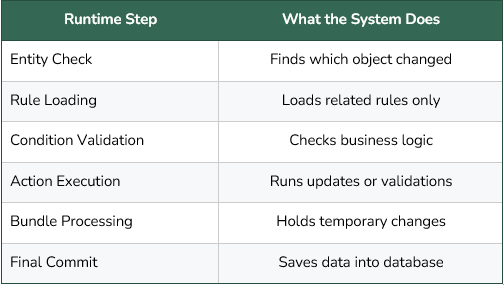
This runtime flow is one of the biggest topics discussed during advanced Guidewire Certification learning because most real production problems happen during execution.Why Does Rule Order Matter?
Rule order is very important in Guidewire. Two correct rules can still create wrong output if they run in the wrong sequence.
For example, one rule may update reserve amounts while another rule checks approval conditions. If the approval rule runs first, the transaction may fail because updated reserve data is not available yet.
The engine checks many things before executing rules:
● Transaction stage
● Rule priority
● Object condition
● Runtime trigger
● Data dependency
Because of this, debugging becomes difficult in large projects.
Teams usually check logs to understand which rule started first and where the transaction failed. This is why many professionals take a Guidewire Testing Course to understand runtime failures properly.Understanding Bundles
Guidewire uses bundles during transactions. A bundle is a temporary storage area inside memory where changes stay before saving into the database.
Rules mostly work on bundle data during runtime.
This creates some important behavior inside the system:
● Rules can read temporary values
● Multiple updates can happen together
● Rollback can remove changes
● Runtime values may differ from database values
This is one reason why production debugging becomes confusing sometimes.
Many learners studying through a Guidewire Functional Course get confused when logs show one value while the database shows another value. The reason is that runtime changes still exist inside the bundle and are not committed yet.Runtime Conditions Affect Performance
Conditions inside rules affect application speed directly. If conditions are badly written, runtime performance drops.
The engine checks many objects during execution. Extra loops and repeated checks increase processing time.
Some common problems are:
● Long loops
● Extra database calls
● Repeated object loading
● Deep nested conditions
● Heavy Gosu logic
Even one bad rule can slow down the whole transaction.
Because of this, performance tuning is now an important part of modern Guidewire Training programs. Companies want developers who can write cleaner runtime logic with less server load.Different Rules Run at Different Stages
Guidewire has different rule categories. All rules do not run together.
Some common rule types are:
● Validation rules
● Assignment rules
● Activity rules
● Escalation rules
● Pre-update rules
● Post-update rules
Validation rules run before saving data. Pre-update rules modify data before commit. Post-update rules run after the database save process finishes.
This changes how entities behave during runtime.
A field may allow changes during pre-update execution but may become locked later during post-update processing.
This area is important during Guidewire Certification preparation because runtime stages affect business transactions directly.Gosu Logic During Runtime
Guidewire rules use Gosu internally. Gosu handles calculations, validations, loops, and actions during execution.
Bad Gosu code creates runtime issues very quickly.
Some common mistakes are:
● Heavy loops
● Large database queries
● Extra calculations
● Repeated refresh calls
● Unnecessary entity traversal
These problems increase memory usage and server processing time.
Many enterprise teams now include runtime optimization practice in their Guidewire Testing Course because performance issues are becoming common in large insurance systems.Batch Jobs Work Differently
Guidewire also runs batch jobs for bulk processing. Batch execution behaves differently from normal user transactions.
During batch processing:
● Large datasets run together
● Multiple threads execute simultaneously
● Memory usage increases
● Cache usage becomes stronger
● Commit timing changes
This is why some rules work properly during manual testing but fail during nightly batch jobs.
Many advanced Guidewire Functional Course sessions now explain batch runtime separately because insurance companies depend heavily on automated backend processing.Logs Help Find Real Problems
Runtime logs are very important in Guidewire projects. Most runtime issues cannot be solved only by reading rule code.
Logs help teams understand:
● Which rule started first
● Which condition failed
● Which entity caused issues
● Which transaction rolled back
● Where performance became slow
Without logs, debugging becomes very difficult in enterprise systems.
This is another reason why advanced Guidewire Training now includes runtime tracing and log monitoring.Conclusion
The Guidewire Rules Engine controls how insurance applications behave during runtime. It handles validations, calculations, approvals, activities, and transaction flow in the background. The engine does not simply run conditions one by one. It works through bundles, runtime stages, entity updates, and transaction handling. Many production problems happen because teams understand business logic but do not fully understand runtime execution flow.